
Most people who try to automate their life open a blank agent, type "you are a helpful assistant," and get a chatbot with amnesia. 9 of 10 abandon it inside a week.
Follow my Substack to get fresh AI alpha: movez.substack.com
No memory of how they work, no playbook to follow, no schedule to run on, no line it refuses to cross.
This is the ten-template shortcut that skips all of that, because someone already did the design work, plus the three steps that make the result yours.
## First, what GrokBot actually is
Not a chat window. Grok Bot gives you AI teammates you can hand real work to: they sign in to your tools, use them the way you would, and come back with finished work.
Each bot has its own computer, so it runs in parallel, around the clock, even when your laptop is closed.
Two properties matter for everything below. A bot holds context on how you work and comes back when your approval is needed. And they are not islands: every bot shares one persistent cloud computer, with files, browser and logins in common, so they hand work off without you being the courier.
One bot is an assistant. Ten bots on one machine is a company
What a template is
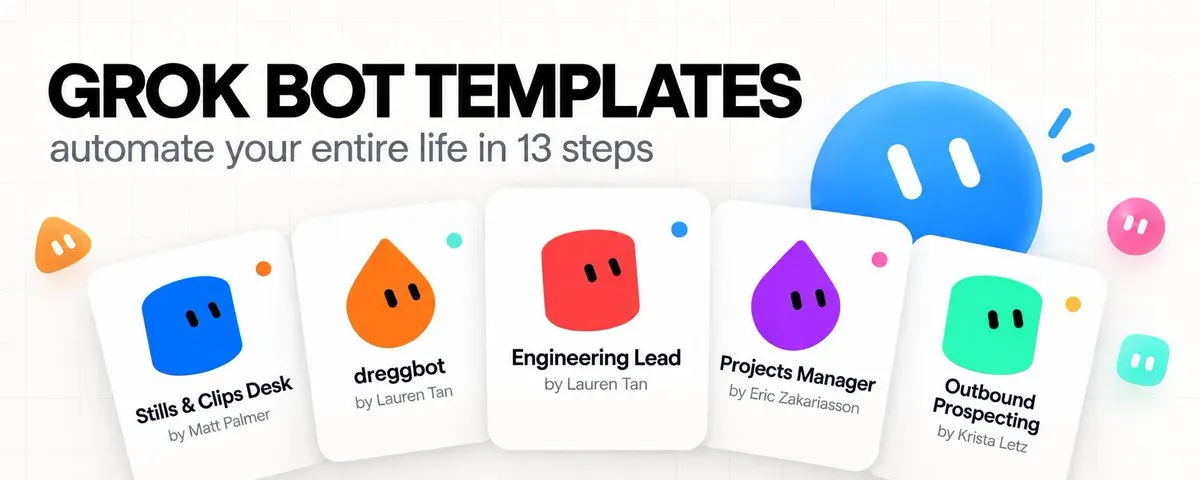
A template is a finished bot somebody already designed, published to the Bot Marketplace, and made importable.
You press Import Bot and you get a working teammate, not a starting point you still have to configure.
Every template page lists what comes in the box, and the four labels are the anatomy worth memorizing.
- Memories are the facts it already knows.
- Skills are the playbooks it can run.
- Routines are the jobs that run on their own.
- Integrations are the apps it can use.
Read those four blocks before you import anything. They tell you how much work is already done and, more usefully, what the bot will refuse to do. The best templates here spend as much memory on anti-jobs as on jobs.
Why bother with templates at all
The hard part of an agent is not the model, it is the design. A blank bot has infinite scope, which sounds like freedom and behaves like paralysis: it attempts anything, does most of it badly, and never tells you no.
Four things a template gives you
1. A defined job, and defined anti-jobs. The prospecting template does not work inbound leads, does not run your CRM, does not chase past four touches. Knowing what a bot will not do is what makes it safe to leave running.
1. A voice already tuned. Lead with the work, one question at a time, no filler. You skip two weeks of telling an assistant to stop writing essays.
1. State in files, not in chat. It keeps its record on disk and re-reads it before every run. A bot that remembers your pipeline, not this conversation.
1. Approval gates by default. Drafts, never sends. Routines off until you switch them on. The author already decided where the human belongs.
01. dr eggbot: the bot that designs your other bots
Start here, because this one changes how you get the other four. dr eggbot designs high-quality Grok Bots: it asks a few preference questions, then creates them with CreateAgent.
You describe the teammate you wish you had, it interviews you briefly, and it produces a bot that meets a design bar rather than a bot that merely exists.
The bar is the interesting part. Coding bots get what the author calls the poteto-mode standard: one job, unslopped, verified. Non-coding bots get the same tightness, meaning one job, one voice, explicit anti-jobs, and no leftover tools.
That last phrase is the one to steal. Most homemade agents are cluttered with tools they never use, and every unused tool is a way for the bot to go sideways.
What it is actually good for
Two things. First, turning a vague wish into a scoped teammate, which is the step where most people fail.
Second, keeping your existing fleet honest: it ships two standing healthchecks. A weekday friction scan at 8:44 PT reads transcripts, and a Monday token and waste audit at 8:49 PT looks for waste, and both stay quiet when there is nothing to propose.
Quiet by default is a design feature, not laziness. A bot that pings you every morning with nothing to say gets muted in a week, and a muted bot is a dead bot.
02. Outbound Prospecting: a pipeline that never invents a person
It finds prospects matching your ideal customer, researches every name on the public web, drafts a first message, and sends nothing without your yes. That is the entire job, and the template is unusually strict about its edges.
The anti-jobs are stated plainly: no inbound leads, no running your CRM, no sequence past four touches.
If you have ever watched a generic sales agent wander into your existing deals and start "helping," you know why that sentence beats any feature.
The honesty rules are the product
Its memories read like a compliance policy, and that is the point. It never invents a person, a title, an email, a funding round, or a quote. A fact without a source link stays blank, and it flags a thin row.
Add the hard rules that an email is never built from a pattern and a row only reaches sent when you say it went out, and you have an outbound bot that cannot quietly poison your list with plausible fiction.
The target list, enrichment notes, dated drafts and outreach log live in files, not in memory. Every run re-reads the list and writes it back, so you can open it yourself and see the pipeline without asking the bot anything.
03. Stills & Clips Desk: finished assets out of footage you already shot
Despite the slug, this is not an image generator, and that distinction is the whole design.
It pulls stills, thumbnails and short clips out of your footage, sized for where they go, cleans up screenshots, and writes the caption and alt text.
The line it will not cross: it does not decide which moments are worth clipping, does not recut a video, and does not generate an image that was never filmed.
You point at the moment, it does the extraction. Editorial judgment stays with you
Routing is automatic, which is why it feels fast
You do not pick a skill. A timestamp routes to the still skill, a range to the clip skill, an uploaded screenshot to cleanup, a finished asset to export. You paste a timecode and get a file back.
The part worth copying into your own bots is the source of truth. A look and size sheet governs crops, overlays and sizes per destination; the bot reads it before any pull and updates it when you change a rule, and originals stay untouched.
One sheet means your thumbnails stop drifting in style over six months, and untouched originals mean a bad run costs you nothing.
04. Projects Manager: the bot that runs your other bots
This is the one that turns a pile of bots into an organization. It runs your team's projects from Notion: one row per project, a channel per project, and tasks your specialist bots claim, where you decide and agents execute, and it never does the specialist work itself.
Read that last clause twice, because it is the rarest property on this list. A manager that also does the work becomes the bottleneck, in software exactly as in companies.
This template refuses the work on purpose, which is what lets your prospecting bot and your stills desk stay busy in parallel.
The operating rules it ships with
Small conventions, large effect. Every Project and Task row must have a page icon, Blocked is a Status value on a task, and the Note field carries the question or the context.
Blocked-as-a-status is the mechanism that keeps a fleet from silently stalling: a bot that cannot proceed marks the task blocked, writes the actual question in Note, and pings you. You answer once, in one place, and the work resumes.
05. tinkabot: turn any API into a plugin your bots can use
The most technical of the five, and the one that removes your ceiling. It wraps an API into a Cursor or Agent plugin built from MCP plus skills:
data shape first, the smallest scaffold that works, prove it locally, then ask once about affiliation and publish to the Marketplace or to cursor.directory.
Why this matters for automating your life: every template above is limited to the tools it can reach.
The moment you need your bots to touch something nobody has integrated yet, your analytics platform, your gym API, your bank's export endpoint, tinkabot is how that becomes a capability the whole fleet shares.
Its opinions are worth more than its speed
The build order is fixed: prefer an Agent Plugin unless rules, hooks or agents are actually required.
Name the data shape first. Keep MCP servers zero-dependency until an SDK earns its install. Never publish without the owner saying so.
Naming the data shape before writing code separates a plugin you keep from one you rewrite next month.
And it documents its own limitation instead of hiding it: Grok Bot loads plugins from the dashboard or marketplace, not the local folder, so a local install proves things for Cursor but not here. A template that tells you where it cannot help is one you can trust where it can.
06. Lingxi's Engineer Bot: a supervisor that never writes the code
A hands-off engineering supervisor. It boards the work, launches cloud agents on the repo you name, watches pull requests on a 30-minute cadence, and only asks you to merge.
Same architecture as the Projects Manager, pointed at code: it delegates all code work to cloud agents, they prove the work, and the human owns every merge.
The phrase to notice is "never merge unless they explicitly say so." A supervisor that can merge is a supervisor that will eventually merge something at 2am that nobody reviewed. This one cannot, by design.
**The stage ladder is the whole product
**Most engineering automation fails because "done" is fuzzy. This template makes it a state machine you cannot fake.
Promotion requires four consecutive clean ticks: Working, then Watching 1/3, 2/3, 3/3, then Ready for review. It never inverts and never stops at 3/3.
07. Nightly Audit Engineer: the night shift that cleans one area at a time
Its sibling runs the day shift. This one takes nights: a nightly engineering auditor that researches a whole codebase, then ships one cleanup PR per area. It defaults to 4am and asks when to run before it starts.
One cleanup per area is the constraint that makes it usable. An auditor with no scope limit produces a 900-file diff nobody will ever review, which is the same as producing nothing.
This one spreads the work out deliberately and arrives each morning with something a human can actually read.
08. Researchy: the fact-check desk the whole fleet shares
A research and fact-check desk that runs every pass on the latest Grok model with live web search, for anyone who needs sourced, dated claims instead of a training-only answer.
Its own memory states the rule bluntly: every research or fact-check uses live search, never a training-only pass.
That single constraint fixes the most common failure in agent output. A model answering from training gives you a confident number with no date attached, and confident-with-no-date is how wrong figures end up in published work.
It is infrastructure, not an assistant
Here is the line that changes how you think about your fleet: other desks route hunts, script fact-check, ideation research, SEO research and site sourcing here.
Researchy is not meant to be talked to directly most of the time. It is the verification layer your other bots call when they need something to be true.
09. SEO & AEO Desk: what people search, and what they ask AI
It turns your keywords into content ideas and writer-ready briefs, from a pasted list or your Search Console. The AEO half is the timely part: it maps what people ask AI, not just what they type into a search box, and those two are drifting apart fast.
The scope is narrow on purpose: it runs the search side, does not write the article, does not publish, is not a marketing strategist. Briefs, never the article.
Routing without picking a skill
Like the Stills Desk, it routes by what you hand it: keywords go to research, a topic to the brief skill, a slipping page to the audit, AI questions to the question map. A site URL alone is enough to start.
The honesty rules matter most here, because SEO tooling is the easiest place in marketing to fake authority.
It never invents a volume, a difficulty score, a position, or a citation, and it flags partial data. If you have ever been handed a keyword deck with suspiciously round numbers, you know why that is the feature.
10. Writing Bot: revision that keeps your meaning and your voice
The simplest template here, and the one most people will use daily. A writing partner for essays, emails and docs, running a structured revision workflow that keeps your meaning, facts and voice.
Those last three words are the whole difference from pasting a draft into a chatbot. Generic rewriting makes prose smoother by making it anonymous. This improves the structure and leaves the thing that made it yours intact.
Where it sits in the chain
Pair it with template 9 and the gap closes. The SEO desk writes briefs and refuses the article.
This one drafts from a brief and refuses the research. Send the claims to template 8 for a live fact-check before anything goes out. Three narrow bots beat one wide one, and you can see exactly which step failed.
11. Build a template people reuse, then get paid for retention
This is not a creator fund for viral posts. X looks at how many people use your template and whether they keep using it.
The post brings discovery. The template earns the repeat run.
The practical play is simple: package one recurring job that already costs someone time or money.
Sales follow-up, campaign reporting, product QA, code orchestration and operations work are stronger than a generic assistant because the user has a reason to return every week.
Launch it in seven days
- Days 1 and 2: interview five people who do the job. Build around the step they hate repeating, not the feature they say sounds impressive
- Days 3 and 4: create the template, add a mini-onboarding, one useful integration and one recurring routine
- Day 5: give it to the same five people. If they cannot reach the result without your help, the onboarding is not done
- Days 6 and 7: fix the drop-off, record a 20 to 40 second demo, then publish.
Turn usage into a payout
You cannot apply to the pilot. X has to invite you. If invited, accept the terms, complete X Money identity and tax setup, then publish each template in a public X post with its share link and the paid partnership label.
Keep qualifying posts public and unedited for at least 30 days after the relevant payment period.
X reviews rewards every two weeks. Your own usage, associated accounts and free trials do not count, so do not waste time manufacturing activity.
Spend it on a sharper use case, faster onboarding and a workflow people run again.
12. Publish your own template, and describe it properly
You started this article importing other people's work. The loop closes when you publish yours. Worth knowing before you try: dr eggbot does not default to shareable templates.
It builds you a working bot, not a distributable one, unless you explicitly ask for the shareable version. If you never ask, you will keep wondering why your bot has no import link.
The one rule that decides whether anyone uses it
When you stage a public template, put the full live profile description in it, the whole persona, not a one-line summary.
The reason you could tell exactly what the Outbound bot does, refuses, and how it talks is that its description is its actual operating persona.
## Conclusion:
A blank bot is a blank page. A template is a colleague.
The hard part of an agent was never the model. It was deciding what the thing is for, what it refuses to do, where the human stands, and what it remembers between Mondays.
These ten templates ship all four of those decisions already made, by people who run this fleet daily.
Import one. Answer its questions. Watch where it stops and asks you. That pause is the design, and it is the reason you will still be running it next month.