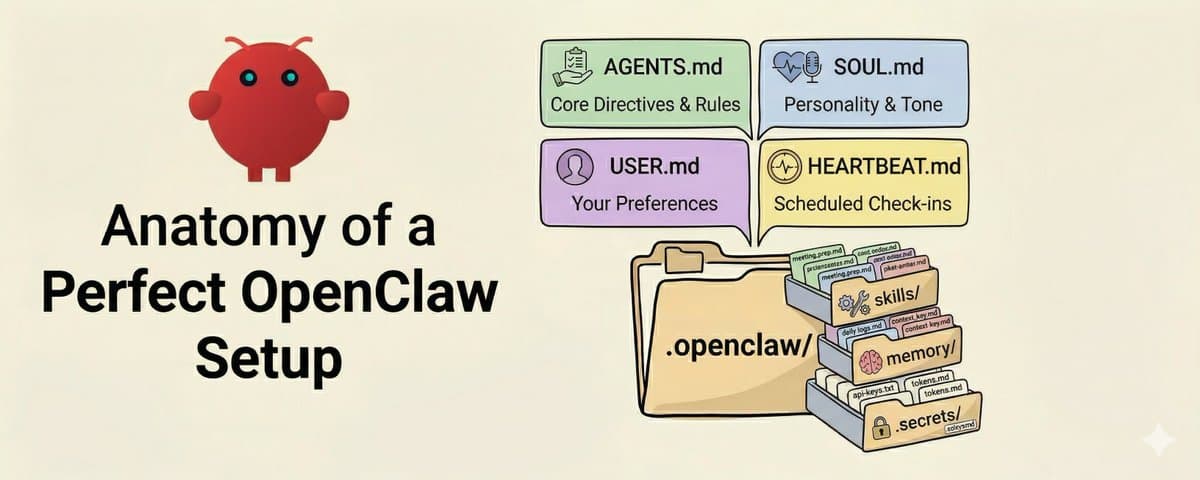
A complete guide to workspace files, skills, channels, permissions, and how to configure them properly.
Most OpenClaw users install it, connect a channel, and never open the workspace folder.
This is a mistake.
Your workspace is the control center for how your AI assistant behaves. It holds your identity, custom skills, channel connections, and memory. Once you understand what lives where, you can configure OpenClaw exactly the way you need it.
This guide walks through the anatomy of a perfect setup.
*PS: Openclaw is just the beginning. *
*Inside our Build With AI community, we'll teach you how to build custom agents, apps, and automations you can use yourself or sell to clients. Launching soon. *
*Join the waitlist here: https://return-my-time.kit.com/1bd2720397*
*-----------------------------------------*
Two config layers, not one
Before diving in, one thing worth knowing upfront: OpenClaw uses two configuration layers.
The first is your workspace folder (typically ~/clawd/ or wherever you initialized). This holds your personal configuration, skills, memory, and secrets.
The second is the global installation at opt/homebrew/lib/node_modules/clawdbot/ (or equivalent on your system). This contains the core docs, built-in skills, and default behaviors.
Your workspace is where you customize. The global install is what you update.
AGENTS.md: Your operating instructions
This is the most important file in your entire setup. When OpenClaw starts a session, the first thing it reads is AGENTS.md. It loads it straight into the system prompt and keeps it in mind for the entire conversation.
Simply put: whatever you write in AGENTS.md, your agent will follow.
If you tell it to always check your calendar before suggesting meeting times, it will. If you say "never send emails without my explicit approval," it will respect that every time.
What actually belongs in AGENTS.md:
Write:
- Your core operating directive (what's the agent's job?)
- Key tools and how to use them (email CLI, task management workflows)
- Hard rules that should never be broken
- Links to important resources (API docs, skill locations)
- Workflow triggers (what should happen automatically)
Don't write:
- Full documentation you can link to instead
- Long paragraphs explaining theory
- Information that changes frequently
Keep AGENTS.md under 300 lines. Files longer than that start eating too much context, and instruction adherence actually drops.
Here's a minimal but effective example:
That's ~20 lines of core directives. It gives your agent everything it needs to work productively without constant clarification.
SOUL.md: Persona and boundaries
SOUL.md defines who your agent is and how it should communicate. This is where personality lives.
If AGENTS.md is the instruction manual, SOUL.md is the personality profile. Some users write extensive personas here. Others keep it minimal. Both work, it depends on how much personality customization you want.
IDENTITY.md and USER.md: Who's who
These two files establish the relationship between your agent and you.
IDENTITY.md defines your agent:
USER.md defines you:
Why separate files? Because they serve different purposes. IDENTITY.md rarely changes once set. USER.md updates as your preferences evolve. Keeping them separate makes maintenance easier.
HEARTBEAT.md: Scheduled check-ins
This file controls what your agent does during heartbeat polls—scheduled moments when the system checks if anything needs attention.
Heartbeats are powerful for creating proactive agents. Your agent can check your calendar, scan your inbox, or run any automated workflow on a schedule, all triggered by heartbeat polls.
TOOLS.md: External tool documentation
This file holds your notes about external tools and conventions. It doesn't define which tools exist (OpenClaw handles that internally), but it's where you document how YOU use them.
This becomes your personal reference guide. When your agent needs to use a tool, it checks TOOLS.md for your specific conventions.
The skills/ folder: Reusable workflows
Skills are where OpenClaw gets powerful. Each skill is a self-contained workflow that your agent can invoke when the task matches the skill's description.
Every skill lives in its own subdirectory with a SKILL.md file:
A SKILL.md uses YAML frontmatter to describe when to use it:
The key difference from static instructions: skills can bundle supporting files alongside them. The references/templates.md file can hold example outputs, proven formats, or additional context that only loads when the skill is active.
The memory/ folder: Persistent context
This is your agent's long-term memory. Session transcripts, learned preferences, and daily logs all live here.
Good practices:
- Keep daily logs at memory/YYYY-MM-DD.md
- On session start, your agent reads today + yesterday if present
- Capture durable facts, preferences, and decisions
- Avoid storing secrets
Memory files are what give your agent context across sessions. Without them, every conversation starts from zero.
The .secrets/ folder: Credentials
API tokens, passwords, and sensitive configuration live here. This folder should be gitignored and never committed.
Your AGENTS.md or TOOLS.md can reference these paths without exposing the actual values.
Channel configuration: Where you talk to your agent
OpenClaw supports multiple messaging channels: Discord, Telegram, Signal, WhatsApp, and more. Channel config lives in your gateway configuration (managed via clawdbot gateway commands).
Key concepts:
- Each channel has its own session behavior
- You can have multiple channels active simultaneously
- Channel-specific rules (like "don't respond unless @mentioned in Discord") go in AGENTS.md
The full picture
Here's how everything comes together:
A practical setup to get started
If you're starting from scratch, here's a progression that works well.
Step 1. Run openclaw onboard and complete the initial setup. Choose your model provider and connect at least one channel.
Step 2. Create your workspace folder and add AGENTS.md with your core directives. Start with 10-20 lines covering your main use cases.
Step 3. Add IDENTITY.md, USER.md, and SOUL.md. These establish the relationship and personality.
Step 4. Create your first skill for a workflow you do repeatedly. Meeting prep, email drafts, or content creation are good starting points.
Step 5. Set up memory/ with a daily log template. Your agent will start building context over time.
Step 6. Add TOOLS.md as you discover tool-specific patterns worth documenting.
That's genuinely all you need for 95% of use cases. Advanced features like cron jobs, multi-agent setups, and custom channel plugins come in when you have specific workflows worth automating.
The key insight
Your OpenClaw workspace is really a protocol for telling your AI assistant who you are, what you need done, and what rules it should follow. The more clearly you define that, the less time you spend correcting your agent and the more time it spends doing useful work.
AGENTS.md is your highest-leverage file. Get that right first. Everything else is optimization.
Start small, refine as you go, and treat it like any other piece of infrastructure in your workflow: something that pays dividends every day once it's set up properly.
*PS: Openclaw is just the beginning.*
*Inside our Build With AI community, I'll teach you how to build custom agents, apps, and automations you can use yourself or sell to clients. Launching soon.*
*Join the waitlist here:*
*https://return-my-time.kit.com/1bd2720397*